

Write Conclusions Faster: Your AI Shortcut Tool
A conclusion is a crucial element of any written work, offering closure and a recap of the main points. An effective conclusion should reaffirm the thesis or main idea, recap the key points, and leave the reader with a lasting thought or a call to action. It serves as a final opportunity to leave a strong impression on the reader and ensures that the message of the writing is clear and impactful.
How to Write a Conclusion Using a Shortcut?
Writing a conclusion is an essential part of any piece of writing as it provides closure and summarizes the main points of the text. A good conclusion should restate the thesis statement or main idea, summarize the key points, and leave the reader with a final thought or call to action.
When using a “Write conclusion” AI tool, it is important to ensure that the conclusion accurately reflects the content of the text and effectively wraps up the main points. The AI tool should be able to generate a conclusion that is cohesive and concise, tying together the key ideas and leaving the reader with a clear understanding of the overall message.
It is also important to consider the tone and style of the conclusion, ensuring that it matches the tone of the rest of the text and leaves a lasting impression on the reader. The AI tool should be able to adapt to different writing styles and effectively generate a conclusion that is impactful and well-suited to the specific piece of writing.
Overall, a “Write conclusion” AI tool should be able to produce a conclusion that effectively summarizes the main points of the text, leaves the reader with a final thought or call to action, and matches the tone and style of the rest of the writing. This tool can be a valuable resource for writers looking to create impactful and cohesive conclusions for their work.
STEP 1
Begin by opening the book for which you want to create a report.
STEP 2
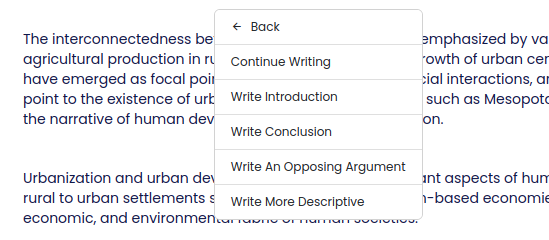
Place your cursor below the content for which you want to generate the Conlusion and type “CTRL + /” to get the options below and select “Write Conclusion”.
1) Selection Tooltip Option
STEP 3
Keep an eye on the right sidebar where the results will start appearing.

Note: When the content is inserted, you will notice two different sets of highlighted text, each assigned a different color. This distinction is made between AI-generated content and the content you have personally written.