

Boost Student Writing with AI Rewrite Selection Tools
Introducing our AI Rewrite tool – the ultimate solution for students to effortlessly rewrite their content and improve their writing skills. Whether you need to refresh an old essay, paraphrase a research paper, or reword a paragraph, our AI Rewrite tool is here to make the process faster and easier.
How To Rewrite Using Selection Tools?
Our advanced technology uses artificial intelligence to analyze the original text and generate a rewritten version that maintains the original meaning and context while providing a fresh and unique perspective. With just a few clicks, students can transform their writing to be more engaging, concise, and impactful.
The AI Rewrite tool is designed to help students enhance their writing skills by providing alternative phrasing, synonyms, and sentence structures to diversify their vocabulary and improve their overall writing style. It also helps students to avoid plagiarism by producing original content that is free from duplicate language or ideas.
Additionally, the tool offers suggestions for grammar and punctuation improvements, ensuring that the rewritten content is polished and professional. By utilizing our AI Rewrite tool, students can save time and energy while producing high-quality, original content that meets their academic or professional needs.
Say goodbye to writer’s block and tedious manual rewriting processes – our AI Rewrite tool is the key to unlocking your full writing potential. Try it today and experience the difference it can make in your writing endeavors.
STEP 1
Begin by opening the book for which you want to create a report.
STEP 2
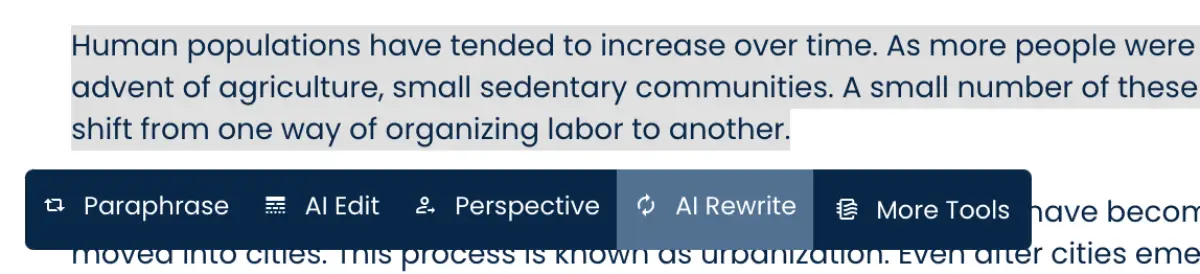
Use the mouse or keyboard controls to select the desired input content, then click on “AI Rewrite” under more tools option.
1) Selection Tooltip Option
2) Topbar Option

STEP 3
Choose an option and provide a prompt if you have any additional requirements.
STEP 4
Proceed by clicking on “Generate Content.”

STEP 5
Keep an eye on the right sidebar where the results will start appearing.

STEP 6
To incorporate the generated content into the editor, click on “Insert Text on the Card.”

Note: When the content is inserted, you will notice two different sets of highlighted text, each assigned a different color. This distinction is made between AI-generated content and the content you have personally written.